

How-to guide
Calibrate, don't re-run
The first result is the opening of a conversation, not a verdict. Here is how to bring an assessment into line with what you know — and the two cases where re-running really is the right call.
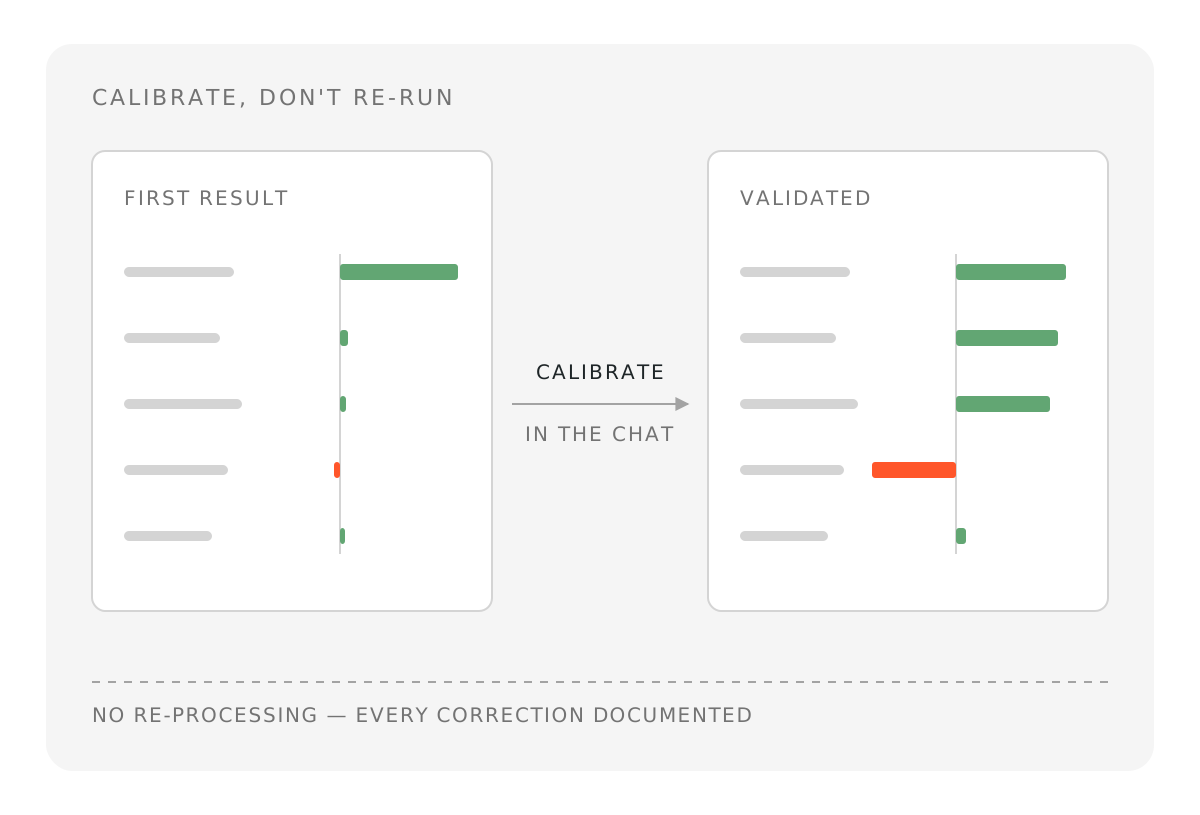
The first result of an assessment is almost never the final one. That is not a defect — it is how impact accounting works. A first run is the software's best reading of an organization or project from the evidence it could find. You know things it does not: what the money was actually spent on, which benefits are already counted elsewhere, what your organization can genuinely claim, and which pathway simply does not belong in the model.
So the interesting question is not "is the first result valid?" — in almost all cases it is a sound, evidence-based model. The question is "how do I bring it into line with what I know?"
There are two possible reactions, and they lead to very different places.
The first is to re-run the analysis, or to start a new project, hoping the next result will look more reasonable. The second is to open the AI assistant and calibrate the model you already have: understand where the number comes from, challenge it, correct it, recalculate.
This guide is about making the second reaction your default habit — and about the small number of cases where re-running really is the right call.
💡 The habit in one line: run the analysis once, then calibrate through the chat. Re-run only when the scope was wrong or roughly half or more of the pathways are wrong.
The difference is easy to see on a real assessment. Below is the same project before and after calibration — no re-processing, only a conversation with the AI assistant.
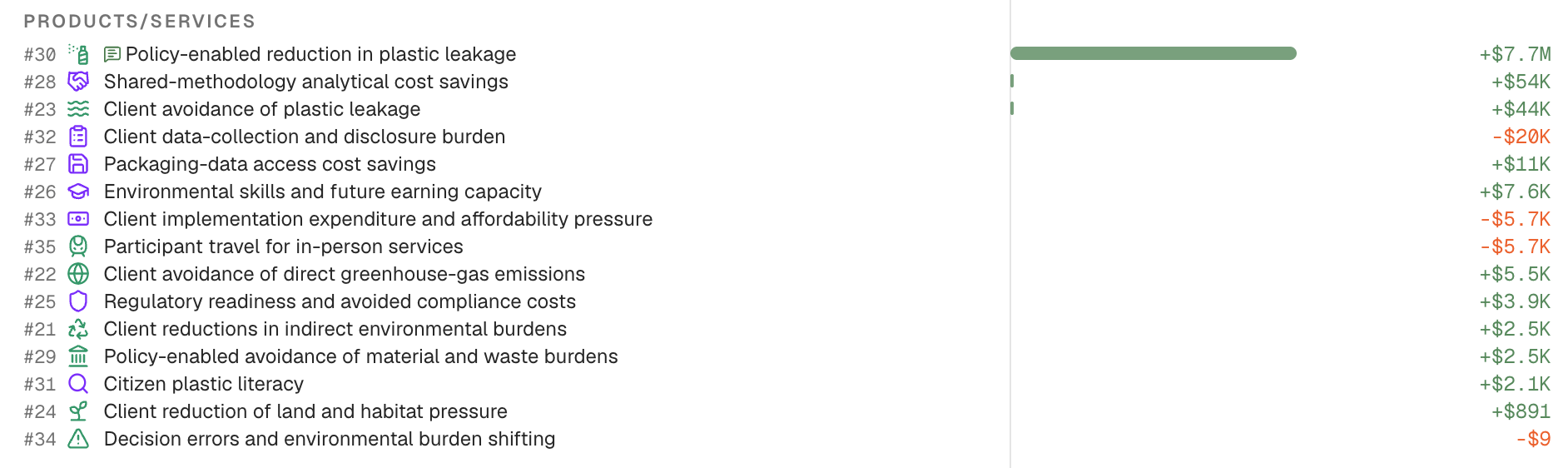
Before — the first result: complete and evidence-based, but not yet balanced the way the team knows the project.
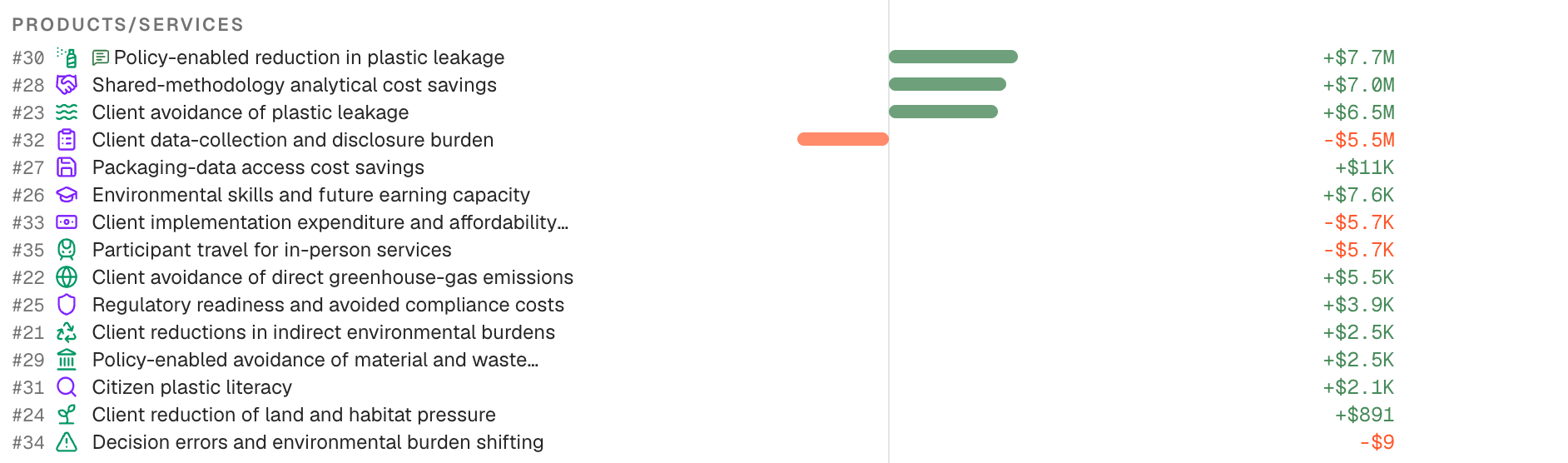
After — the same assessment, calibrated through the chat. No new analysis was launched.
Why re-running does not close the gap
It helps to know exactly which part of the software is deterministic and which is not.
AI is used where judgment and language matter: reading your documents, researching evidence, understanding a business model, proposing pathways and variables, and explaining results. The arithmetic is not left to AI. Once pathways, variables, factors and assumptions are set, the calculation runs on fixed code — for a given version of the engine, the same inputs always produce the same output.
That has a direct practical consequence. Recalculating an edited model is stable. Re-running the whole analysis is not.
When you launch a full processing run again, the software goes back out into the world, finds a slightly different set of sources, and re-forms judgments about pathways, variables and additionality. In our experience the choice of pathways and the order of magnitude of impacts stay reasonably consistent between runs. But specific values move. A pathway you disliked may come back with a different number, or come back at all. Nothing you learned in the first run is carried forward.
So a re-run does not close the gap. It re-rolls the dice on it — and it costs you a full processing cycle to get a result you will have to review from scratch anyway. Users who re-run three or four times usually end up with three or four defensible-looking numbers and no basis for choosing between them. That is the confusion we want to help you avoid.
Calibration does the opposite. Every correction you make is a permanent improvement to the model: the assumption is written down, the reason is recorded, and everything downstream recalculates from the corrected foundation. The model gets closer to your reality with each pass, and it stays there.
The calibration loop
Calibration is the last movement of an analysis, and it never really ends. The software performs its own calibration and deep-dive checks before showing you a result — testing plausibility, scale, composition and evidence quality. Your calibration continues from there, with the knowledge only you have. If you want the full picture of what happens before that point, see How ImpactAccounting.ai works.
The loop has four moves, and the AI assistant — the green button at the bottom right of the screen — is where all four happen.
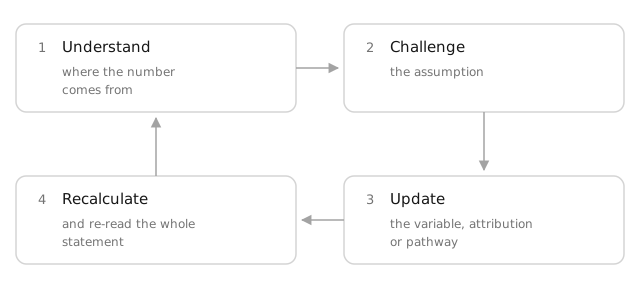
1. Understand before you judge
When a result surprises you, resist the urge to conclude it is wrong. Ask the assistant to explain it first. Surprises come in two flavours, and they call for different questions.
The first is a number that looks off. Every pathway is built from four ingredients — output, outcome, additionality and value factor — and the surprise is almost always concentrated in just one of them. Ask for the breakdown and you will usually find it in seconds.
The second is a pathway you did not expect to see — or the absence of one you were sure would dominate. This is the more interesting surprise, and it deserves patience. We all come to an assessment with a prior conviction about where the value of a project or organization sits. That prior is useful, but it is also a bias: as humans we simplify reality to keep it manageable, and we tend to look hardest where we already expect to find value. The software has no such need to simplify — it maps the whole value chain and all three capitals, including the effects nobody in the room was thinking about. So an unfamiliar list of pathways is more often a widened field of view than an error.
💡 Tip: An unfamiliar pathway is a widened field of view before it is an error. Read it and understand its logic first, then decide whether it belongs in your model.
Start with the breakdown:
Break down the biggest negative pathway into output, outcome, additionality and value factor, and give me the source and confidence level for each.
You can then dig deeper with follow-up questions such as:
- Why is the net societal value negative, and which three pathways drive it?
- Which variables have the largest effect on the total?
- Which numbers come from our uploaded documents, and which come from external research?
- Which pathway has the weakest evidence behind it?
Often this step alone closes the gap. A number that looked implausible turns out to rest on a proxy that is defensible, or on a scope decision you had not considered.
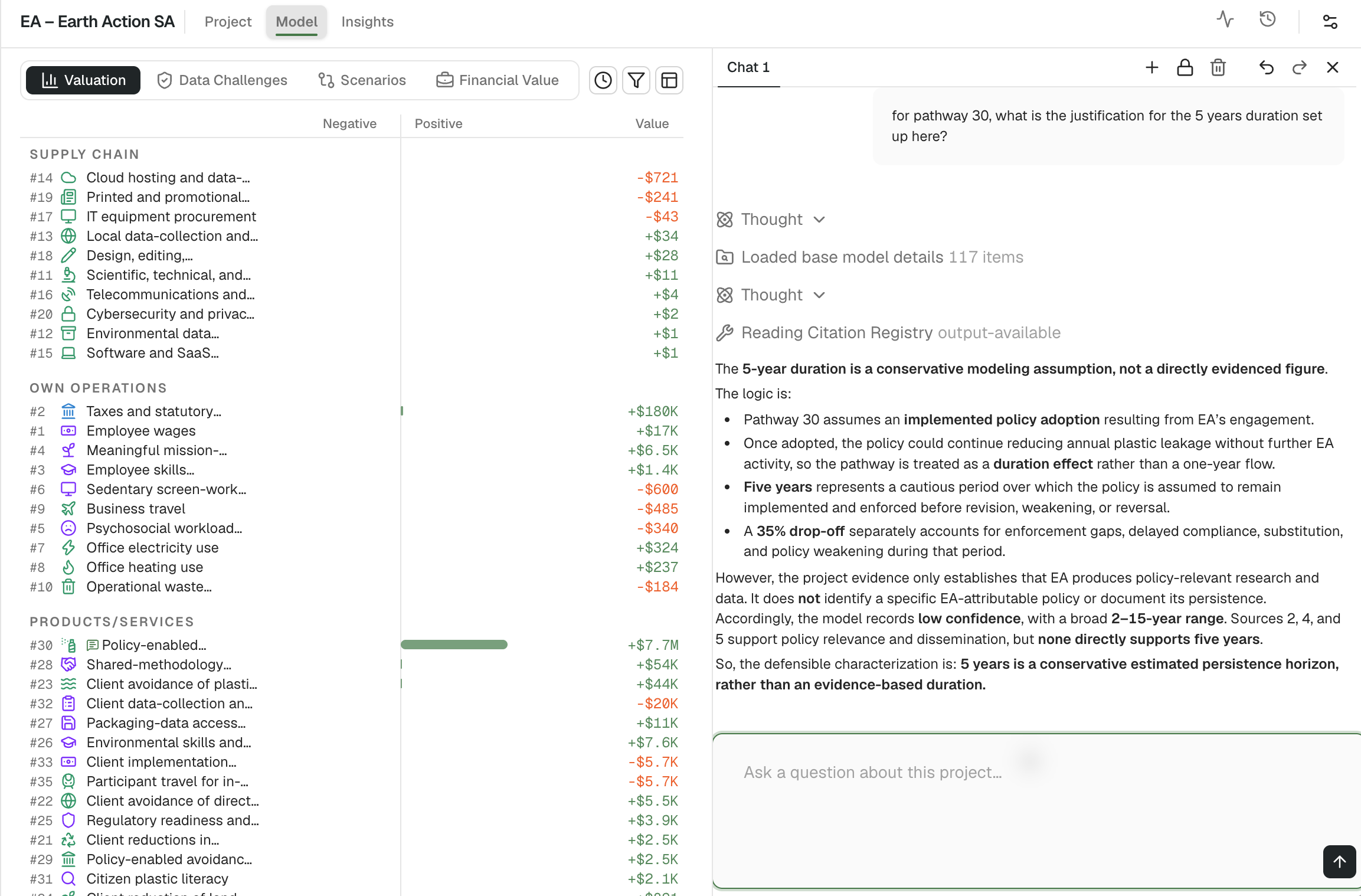
Asking the assistant to explain a result. The answer traces the pathway back to its output, outcome, additionality and value factor, with the sources behind each one — so you can see exactly where the number comes from before deciding whether you agree with it.
2. Challenge in plain language
Once you can see the reasoning, disagree with it explicitly. You do not need to know which field to edit — describe the problem and give your reason:
We can't claim 100% attribution on this pathway — three other funders were involved, and our share of the funding was 30%. Set additionality to 30%.
Other corrections follow the same shape:
- This assumes a 10-year benefit duration, but our funding only covers three years. What happens if I change it?
- The baseline looks too optimistic for this geography. Use a national average instead.
- Here is our actual programme data — replace the estimated participant number with 1,240.
The assistant validates each change before applying it, and every edit is recorded with the diff it produced, so you can always see what moved. Edits to the model itself — variables, pathways, attribution — can also be reverted, either from the chat message that made them or with the undo control in the chat header. That is what makes it safe to experiment.
💡 Tip: Change one thing at a time and say why. The reason is stored with the edit, and it is what makes the assumption defensible to whoever reads the assessment later.
3. Update: the classic case of negative pathways and trade-offs
One family of surprises comes up often enough to deserve its own section: the negative pathways.
The software is deliberately trained to spot the trade-offs and risks that come with any activity, not only the benefits. So an assessment will often surface negative pathways such as the price paid by customers, the time they spend, the cost of the investment or programme itself, social costs borne by workers or communities, the exclusion of people who cannot access or afford the offer, or barriers to entry created in a market. These are methodologically sound — resources consumed and burdens imposed have real societal value — and they are frequently the pathways users did not expect to see.
But which of them belong in your model is a framing choice, not a law. Some users keep the investment cost in, because they want net value created per dollar deployed. Others exclude it, because they are measuring the intervention itself and will compare it to cost separately. The same applies to a price or time trade-off already reflected elsewhere in your reporting.
Both are legitimate. What is not legitimate is re-running the assessment until an uncomfortable pathway disappears. Instead, tell the assistant what you want:
Exclude the implementation cost pathway from the impact statement, and note the reason.
Or, if the pathway belongs in the model but the numbers do not:
- Keep the pathway, but reduce the attribution to our share of the funding only.
- The baseline for this negative pathway is too high — recalibrate it using our actual figures.
- Explain the exclusion pathway before I decide: who is affected, and on what evidence?
Thirty seconds of chat replaces a full re-processing cycle, and the decision is documented for whoever reads the result later.
💡 Tip: Excluding a negative pathway is a framing choice, not a correction. Record why you excluded it, so the boundary of the statement stays readable to an auditor or an investment committee.
4. Recalculate and re-read the whole statement
After each change, look at the whole picture again, not just the pathway you touched. Did the net value move in the direction you expected? Did the balance between natural, human and social capital shift? Is the story still coherent?
The assessment is validated when you can defend every material pathway out loud — not when the number matches what you hoped for.
When you should re-run
Calibration is the default, not a religion. There are two situations where editing is the wrong tool, and both are about the foundation of the model rather than its details.
| Signal | What it means | What to do |
|---|---|---|
| The scope was misunderstood | The software assessed the parent company instead of the fund, the whole organization instead of one programme, or the wrong geography or time period | Start a new assessment with a corrected brief |
| Roughly half or more of the pathways are wrong | The activity model itself is off — the wrong business logic, the wrong beneficiaries, the wrong value chain | Start a new assessment with a corrected brief |
| A few pathways are wrong, missing or mis-valued | The model is sound, the details are not | Calibrate through the chat |
| One number looks implausible | Usually a variable, a baseline or an attribution factor | Calibrate through the chat |
| You want to test a different future or strategy | Not an error at all | Build a scenario from the calibrated model |
Notice what both re-run cases have in common: they are input problems, not AI problems. When scope or the activity model is wrong, it is nearly always because the framing given to the software was ambiguous — a vague description, a missing boundary, no financial data, no indication of what is in and out.
So if you do re-run, never re-run with the same brief. Fix the input: state the boundary explicitly, name the time period and geography, say what should be excluded, and upload the documents that describe what actually happened. A re-run with an unchanged brief is the definition of expecting a different answer from the same question.
💡 Tip: Before starting over, ask the chat what was ambiguous in your original brief. It is faster than guessing, and the answer usually names the missing boundary or the missing document.
A practical routine
For your next assessment, try this:
- Frame carefully before launching. Scope, boundary, period, geography, and any documents you have. Ten minutes here saves a re-run later.
- Read the insights first, the total last. The interpretation tells you where to look.
- Open the chat and ask three "why" questions about the largest positive pathway, the largest negative one, and the weakest data point.
- Make your corrections in the chat, one at a time, giving your reason each time.
- Re-read the full statement and stop when you can defend it.
- Only then consider a scenario, an export, or a comparison.
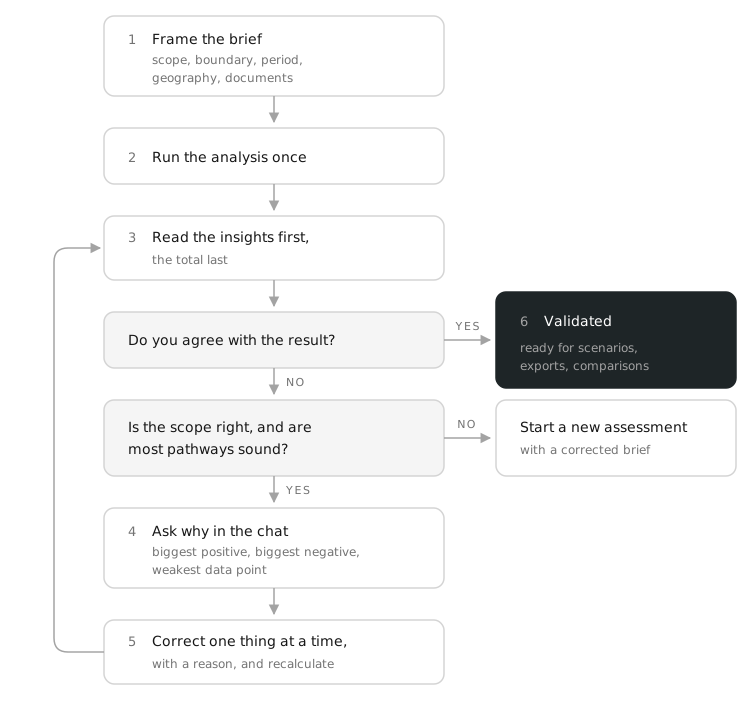
The routine in one picture. Almost every loop runs through the chat; only a wrong scope or a broadly wrong set of pathways sends you back to the brief.
💡 Final tip: Stop when you can defend every material pathway out loud, not when the number matches what you hoped for. That is the difference between a result and a validated assessment.
The mindset shift
The most productive users of impactaccounting.ai treat the first result as the opening of a conversation, not as an answer waiting to be accepted or rejected. They spend far more time in the chat than in the launch screen. They argue with pathways. They ask for breakdowns in the middle of meetings. They leave a trail of documented assumptions behind them.
That is what makes an impact model credible. Not that an AI produced it, but that a knowledgeable person interrogated it, corrected it, and can explain every material line in it.